Orders & payments
Log a cash or Venmo sale
Put a market sale or a DM order into Cottage Kit so your numbers and your bake plan are right.
Half your sales probably don't come through your site. Somebody Venmos you for
two dozen cookies, or hands you cash at a market. Log those here and they behave
like any other order — they show up on your bake plan, they count toward your
revenue, and the customer gets added to your customer list.
An online order is one a customer pays for through your Cottage Kit site. Cash, Venmo and market sales you log yourself never count toward your free ones — keeping good records should never cost you anything.
Log it
- Go to Orders in the sidebar.
- Click Record an order.
- Under Items, use Pick a product… to choose what they bought. Click
+ Add another item for anything else. The Total adds itself up as you
go. - Fill in Customer email. Customer name (optional) is worth doing too —
it's what you'll see on your order board on Saturday morning. - Choose Pickup, Delivery or Shipping, and set a Fulfillment date
(optional) if you know when they're coming. - Under How did they pay?, pick one: Cash, Venmo, Zelle, Cash App, Square,
Card (another processor), or Other. - Leave Already paid ticked if they've paid. Untick it if they're paying at
pickup. - Click Save order.
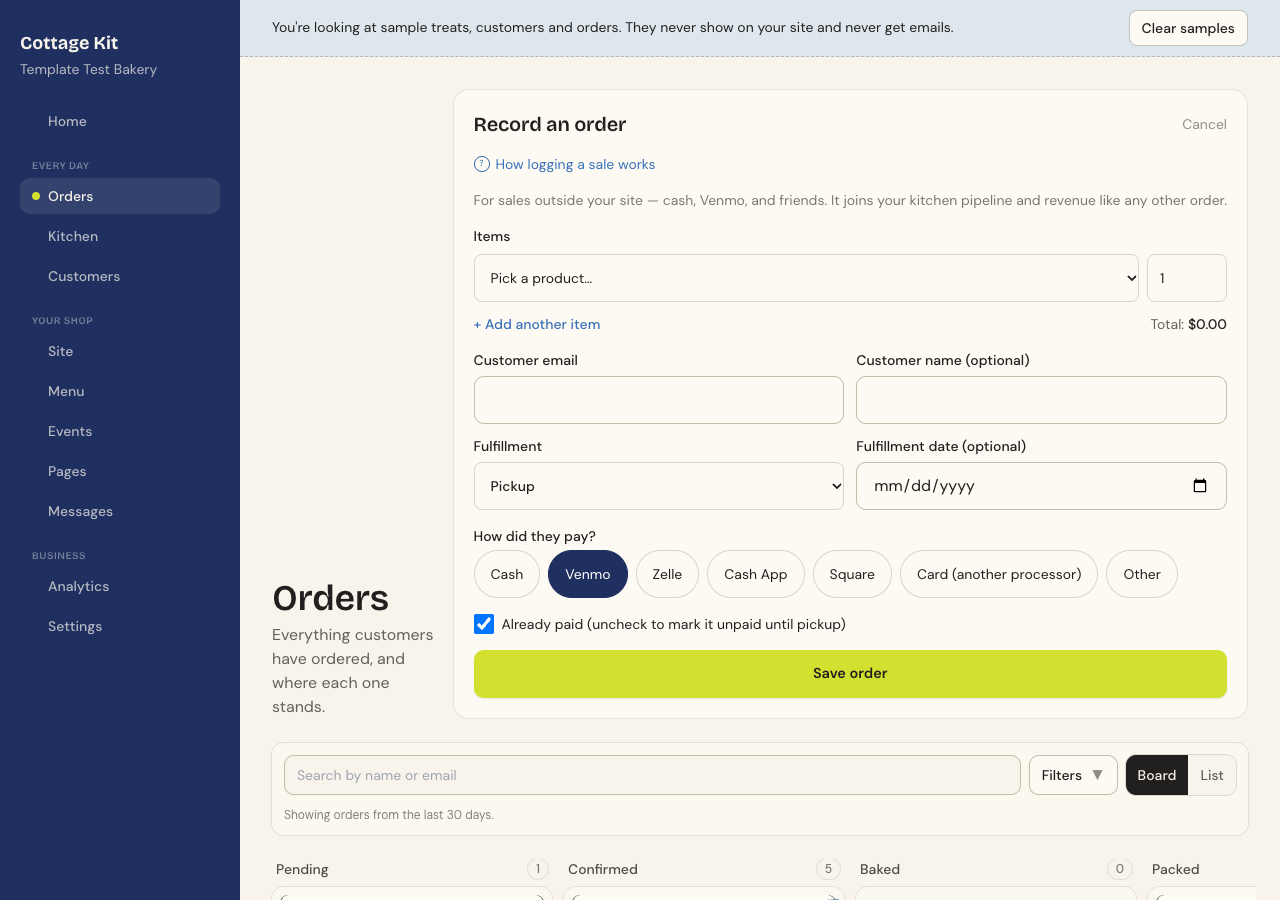
Which payment options show up
The list under How did they pay? is the one you ticked in Settings under
Other ways you get paid. If the way you actually got paid isn't there, add
it there and it'll be waiting next time.
Your Analytics page then breaks your revenue down by each one, which is how
you find out that Venmo is quietly half your business.
A sale you logged never costs you a free order
Worth saying plainly, because every other platform does this the other way
round: orders you log yourself never count toward your free online orders. Log
forty market sales on a Saturday and you've used up none of them.
Keeping good records should never cost you anything. See
What Cottage Kit costs.
What you'll see when it's worked
A toast says Order recorded. — or Order recorded — marked unpaid. if you
unticked the box — and the order appears on your board.
Two more places it shows up, which is the whole point:
- Kitchen counts those items into the day's bake plan, so you don't bake two
dozen short. - Customers now has that person in it, with this order in their history. The
next time they order you'll know they're a regular.
One thing it does not do is email the customer the moment you save it. The
emails start when you move the order along: marking it Confirmed sends your
order-confirmed email, and so do Baked, Packed and Fulfilled as you
tick through them. You can read and reword every one of those under
Messages.
Still stuck?
Email support@cottagekit.app. Tell us what you were trying to do and what you saw instead.
Updated November 23, 2026