Your kitchen & customers
What to bake today
One list of totals for the day, so you're not adding up orders at 5am.
Kitchen answers one question: what do I make, and how many?
It adds up every order due that day and gives you totals by item. Six orders
with cookies in them is one line that says 6, not six orders to read
through and add up before coffee.
Read the plan
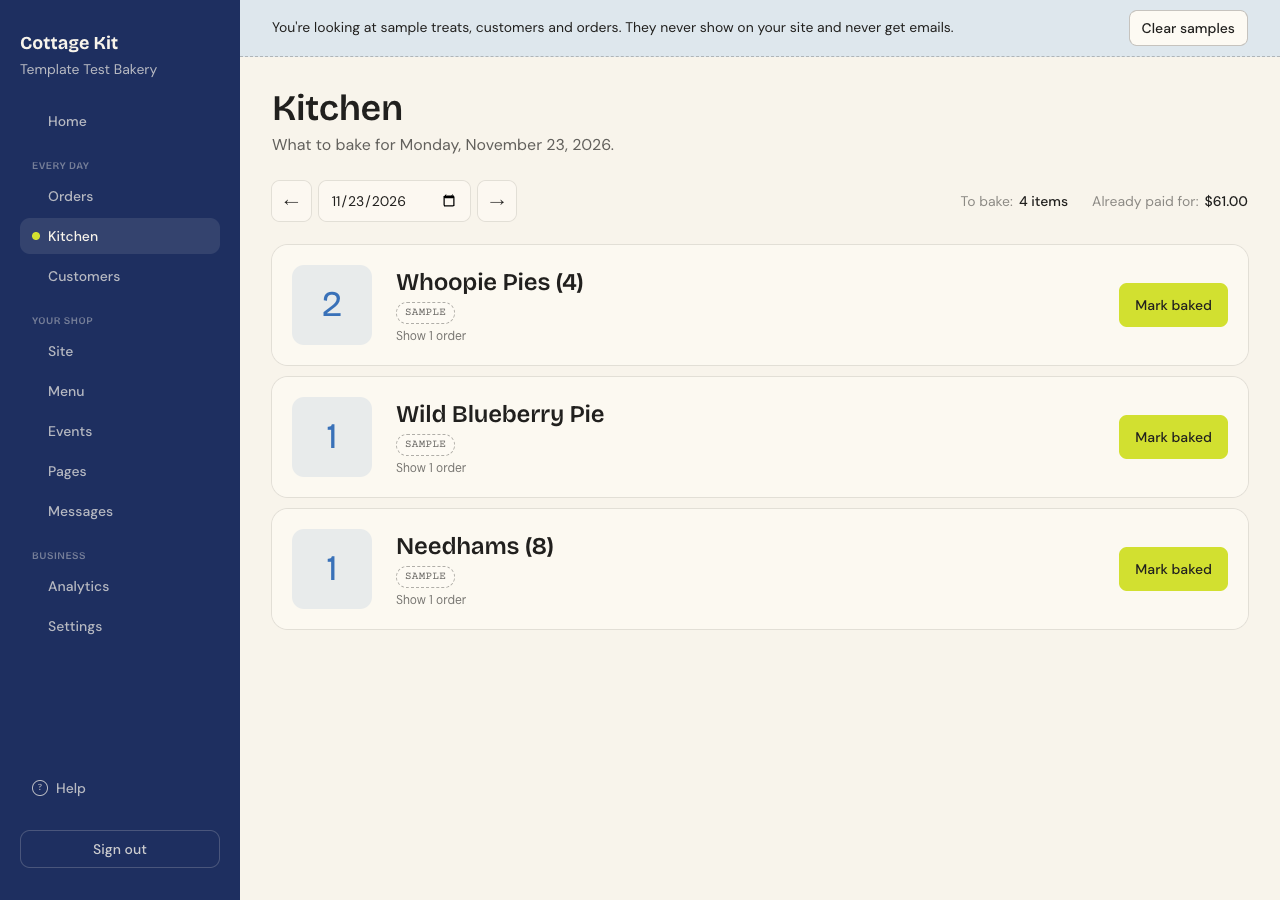
Go to Kitchen. The header says what day you're looking at — "What to bake
for Monday, November 23, 2026" — with arrows to move a day at a time.
Two numbers across the top:
- To bake — how many things to make in total, with the quantities added
up. Three lines of 2, 1 and 1 is "4 items". - Already paid for — the money in the orders on today's plan.
Then the list. Each line is a big quantity, the item, and a button.
Who it's for
Click Show 1 order (or "Show 4 orders") on a line to see which customers
those are. Useful when someone asks to change an order and you want to know
whether it's in today's batch.
Mark a line baked
Mark baked on a line moves every order containing that item to Baked in
one go.
That's the point of doing it from here. On a bake day you think in trays, not
in orders — one click on the cookie line updates all six orders and sends all
six customers their Baked & ready soon email. More on that in
Move an order along.
Today means your today
The day boundary follows the time zone in Settings, not the server's. If
your bake plan rolls over at the wrong hour, that setting is the thing to
check — it's set from your browser when you sign up, so it's usually right.
What's not on it, and why
Two things keep an order off the plan, and both are worth knowing before a bake
day:
- It isn't confirmed yet. The plan is built from confirmed orders only.
An order sitting in Pending is one you haven't said yes to, so it isn't
counted — confirm it and it appears. Clear your Pending column before you
start baking. - It has no date. An order with no fulfillment date lands on the day it
came in rather than the day it's wanted, which is a good reason to put a date
on a cash sale when you log one.
Orders you've already moved to Packed or Fulfilled drop off too. They're done.
What you'll see when it's worked
The line's button changes to Baked, and those orders are in the Baked
column on your order board. Every customer on that line has an email.
Come back the next morning and the plan is the next day's, already counted.
Still stuck?
Email support@cottagekit.app. Tell us what you were trying to do and what you saw instead.
Updated November 23, 2026